Fast Review
Try it in the mockup: /admin/fast-review
Who Uses This
Section titled “Who Uses This”Fast Review is for staff clearing routine disbursement requests that the AI believes are safe to auto-approve. It is intentionally faster than opening each DR detail page, but it still keeps a human reviewer in the loop.
Core Workflow
Section titled “Core Workflow”- Staff scan a page of DR rows.
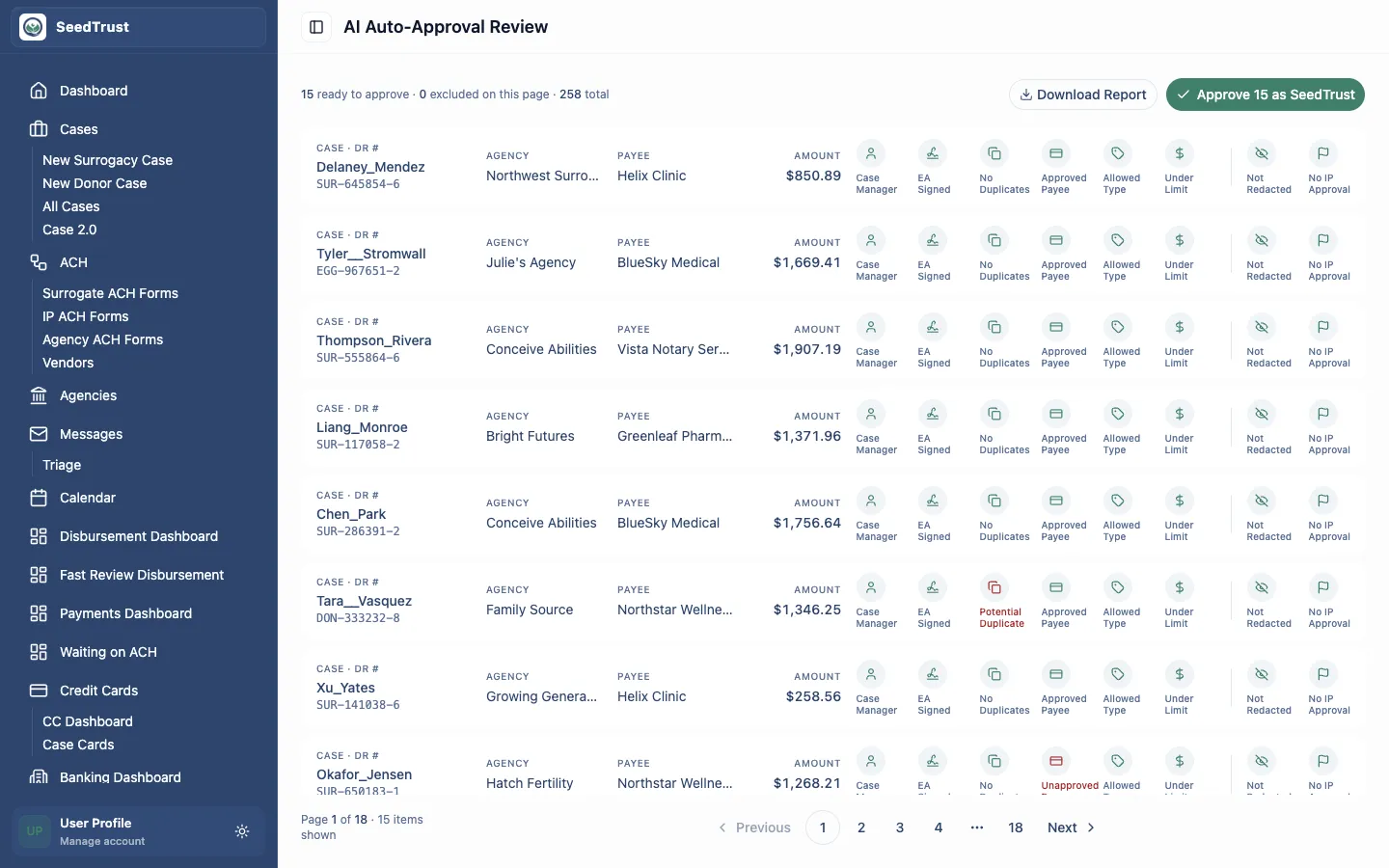
- Each row shows the case, DR number, agency, payee, amount, and AI criteria icons.
- Staff exclude any row they do not trust.
- The reviewer clicks Approve as SeedTrust to approve the remaining rows.
- Excluded rows return to the standard DR dashboard for normal review.
AI Criteria
Section titled “AI Criteria”Fast Review uses eight criteria before a DR appears in the queue.
Positive Criteria
Section titled “Positive Criteria”These should be true:
| Criterion | Meaning |
|---|---|
| Submitter is Case Manager | The DR was raised by a verified case manager. |
| EA Signed | The escrow agreement is signed. |
| No Duplicates | The system found no duplicate prior DR. |
| Approved Payee | The payee is on the approved list. |
| Allowed Type | The request type is allowed for auto-approval review. |
| Under Limit | The amount is below the configured threshold. |
Negative Criteria
Section titled “Negative Criteria”These should not be triggered:
| Criterion | Meaning |
|---|---|
| Redacted | Redacted requests should not auto-approve. |
| IP Approval On | Requests requiring IP approval should not be silently approved. |
Rows with failed positive criteria require staff attention. Rows with negative criteria are routed away from Fast Review.
Exclude And Restore
Section titled “Exclude And Restore”Every row has an Exclude action. Excluding a row removes it from the batch approval count and keeps it available for standard DR review.
The button changes to Restore after exclusion, so staff can undo the exclusion before approving the batch.
Batch Approval
Section titled “Batch Approval”The primary action approves the non-excluded rows on the current page as SeedTrust. The prototype uses an optimistic animation and an undo toast so reviewers can recover from a mis-click before the UI settles.
In production, this action must create durable audit history for:
- Which DRs were included.
- Which DRs were excluded.
- Who approved the batch.
- The AI criteria state at approval time.
- Any undo or later reversal.
Download Report
Section titled “Download Report”Fast Review includes a report modal for date-ranged review of approvals processed through this flow. The prototype opens the modal and demonstrates the controls; it does not generate a real file.
Mocked Behavior
Section titled “Mocked Behavior”The rows, AI criteria, approval animation, report modal, and undo toast are prototype behavior only. Nothing is saved to a database, no ACH batch is created, and no production approval occurs.