DR Triage Dashboard
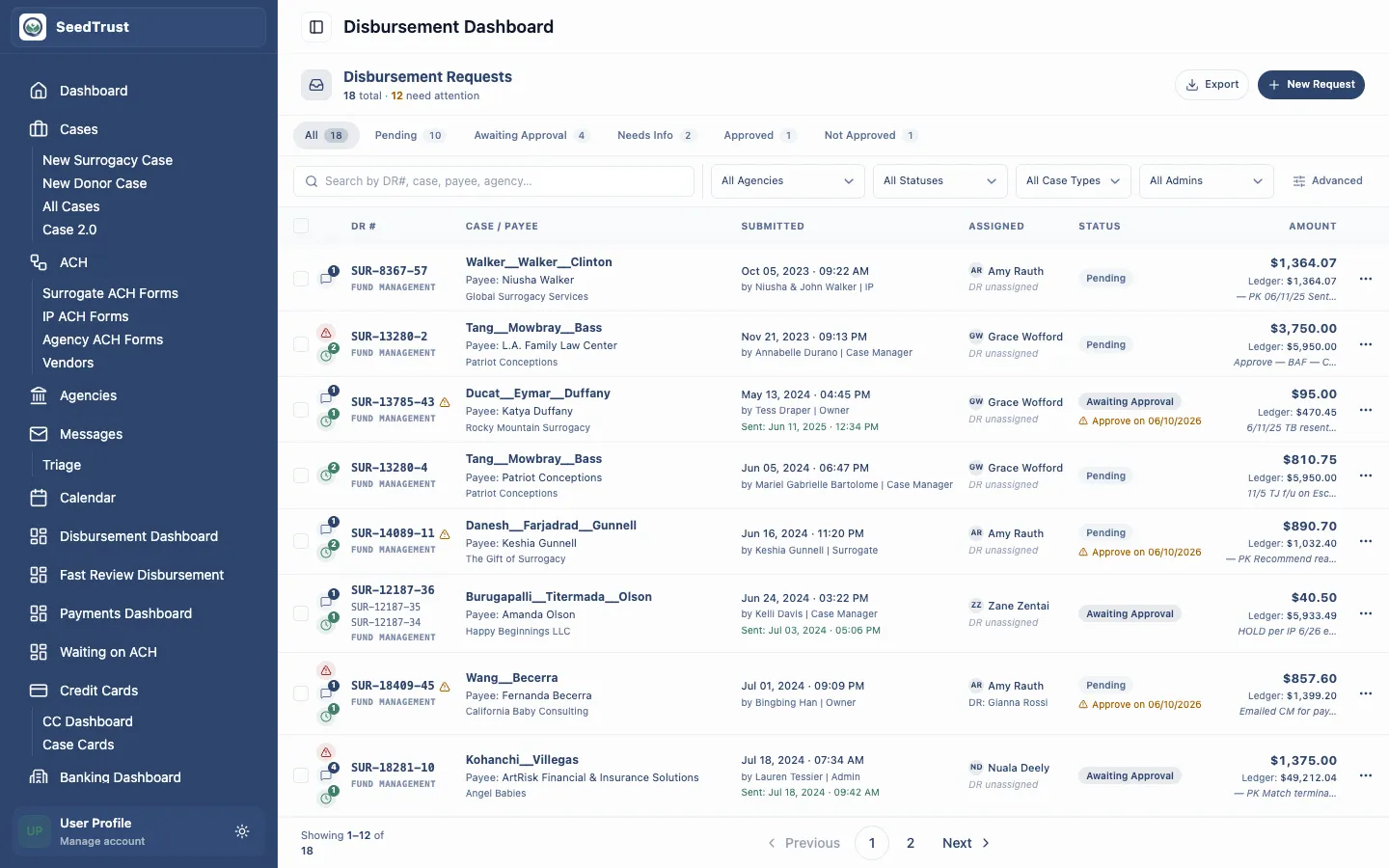
Try it in the mockup: /admin/disbursement
Who Uses This
Section titled “Who Uses This”The disbursement dashboard is for internal staff who need to manage active disbursement requests without opening each request first. It supports queue scanning, filtering, assignment, status review, and navigation into the detailed review workspace.
What Staff Need To Answer
Section titled “What Staff Need To Answer”- Which DRs need action now?
- Which requests are assigned to me or my team?
- Which requests are blocked, flagged, held, redacted, or waiting on approval?
- Which requests can be opened for full review?
- Which requests need bulk handling or reassignment?
Page Layout
Section titled “Page Layout”The dashboard has two major zones:
| Zone | Purpose |
|---|---|
| Filter panel | Narrows the queue by agency, file name, case admin, DR owner, payee, DR number, submitted date, management type, amount, status, flags, case type, insufficient funds, held payments, and awaiting DOO. |
| DR card list | Shows one row per request with identity, people, status, approval signals, financials, and actions. |
Reading A DR Row
Section titled “Reading A DR Row”Each row presents the information a reviewer needs before deciding whether to open it:
- DR number and management type identify the request and escrow model.
- Case and payee details show the file name, agency, submitter, assigned staff, and payee.
- Status badges distinguish submitted, approved, pending, denied, processed, and held work.
- Approval timing and flags show whether the request has a future approval date, auto-authorize signal, redaction, insufficient funds, or other risk indicator.
- Financials show request amount, case ledger balance, and DR number for copy/reference.
- Actions let staff open the detail workspace from the queue.
Filters
Section titled “Filters”The dashboard intentionally exposes many operational filters because staff often work by exception:
| Filter Type | Examples |
|---|---|
| People and ownership | Agency, case admin, assigned DR reviewer, payee |
| Request identity | File name, DR number, case type, management type |
| Money and timing | Line-item amount, batch total, submitted date, awaiting DOO |
| Risk/status | Status, flagged reason, insufficient funds, held payment |
A clear-filters action returns the dashboard to the full queue.
Navigation
Section titled “Navigation”Opening a DR navigates to the detail route:
The detail workspace keeps the reviewer in the admin shell while adding line-item review, notes, document context, and AI findings.
Mocked Behavior
Section titled “Mocked Behavior”The prototype demonstrates the workflow with fixed sample DR data. Filtering and navigation are interactive in the browser, but changes do not persist after reload because there is no backend, database, payment processor, or email system attached.